 English
home  products pe explorer feature tour
SECTION HEADER EDITOR
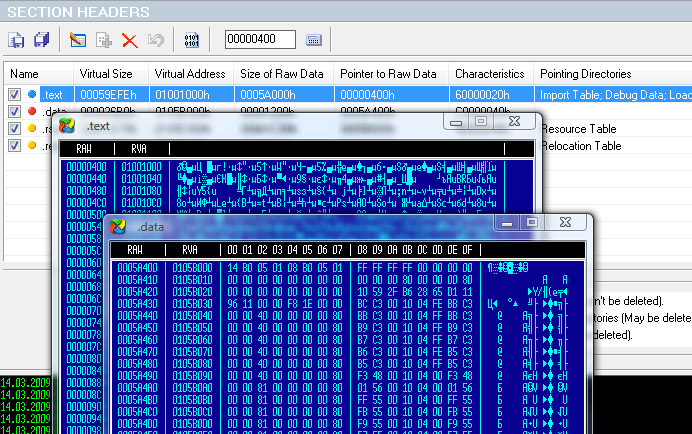
Viewing Sections and Information About Their Location and Size
The Section Headers view shows descriptions of the available sections and their raw data.
A section is the basic unit of code or data within a PE file. For example, the main program code is stored in sections called .text or CODE, the sections called .idata and .edata indicate the import and export tables, the .rsrc section contains all the resources for the file, the .reloc section holds a table of base relocations, and so on.
PE Explorer enables you to view, extract, recalculate, rename, or delete sections from the program body. You can view the number of sections, their names, sizes and properties, you can edit all the fields in the section header, or repair and restore the damaged section header's settings.
When you view contents of the chosen section, it is possible to open up to 16 view windows and toggle the browse mode between text and hex. You can also save out the contents of individual sections to disk.
Section Editor, Flags and File Image Dump HEX Browser
The Section Editor lets you edit section names and size, restore lost values, repair sections' characteristics, browse a file image dump. The built-in calculator will help you calculate the Size of Raw Data value.
At the top of the Section Editor, the values reported by the section header are displayed. In addition, two values are displayed which are pointers to the offset from the beginning of the data belonging to the given section. The first (Hdr Ptr to Raw Data), contains the value stored in the section header. The second (Abs Ptr to Raw Data), displays the real (absolute) value of offset. In the case of intact files, these values will be equal. There is also the Restore All button. This allows you to restore all the values modified during editing.
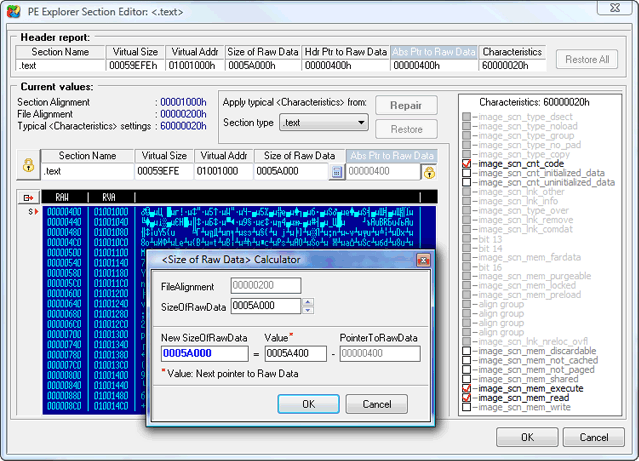
In some cases, for example after unpacking an executable file, the original values of sections' offsets to real data in the file appear to be lost. The sections' characteristics (one of the important parts of the section description, which defines behavior during operation of an executable file) also may be broken.
All this, both as a whole and separately, can be mirrored during correct execution of the file, or result in the complete destruction of validity.
Restoring lost values is not an easy task. In many respects it depends on intuition and supposition, and is practically impossible to completely automate the given process. The Section Editor allows you to facilitate a solution to these problems. In case of damaged characteristics, the Repair button allows you to automatically place flags, according to recommended values for the section of the given type.
See also Error checking and File Repair


 Download a 30 day trial version of PE Explorer Buy the Full Version