 English
home  products pe explorer feature tour
EXE DELAY IMPORT VIEWER
Information on Linked Delay-Load Libraries
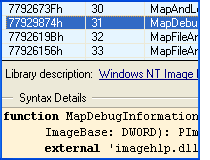 The EXE Delay Import Viewer provides insight into linked delay-load libraries associated with an executable file. It presents a compilation of information about the functions that an executable imports without immediate loading. These functions are derived from Dynamic Link Libraries (DLLs), and the viewer highlights the specific DLLs from which the program imports these functions. This feature is valuable for understanding the deferred loading of functions, aiding in comprehensive analysis of executable files.
See also:
 How do I get parameters on function exports?
DLL Export Viewer
EXE Import Viewer
Function Syntax Lookup
Retrieve the List of Delay-Load Imported Functions
The Delay Import table was added to the EXE image in order to support a uniform mechanism for applications to delay the loading of a DLL until the first call into that DLL. This is a better way for a loading a DLL which is rarely used. That is, the DLL is linked but not actually loaded, the operating system lets you put off loading a DLL and hooking up to its APIs until you actually call the API.
This feature does not exist in Windows 9x and prior versions of Windows NT.
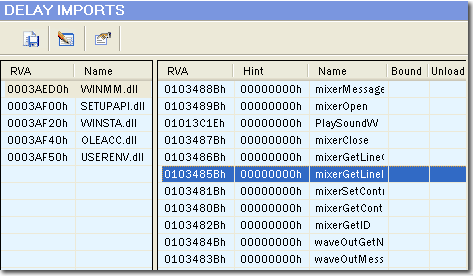
LEFT PANE
RVA — Address of ASCII string containing the DLL name. This address is relative to the Image Base.
Name — Name of the DLL in which the imported functions reside.
RIGHT PANE
RVA — RVA of an array of of 32-bit numbers for PE32, 64-bit for PE32+. The collection of these entries describes all imports from the image to a given DLL.
Hint — Index into the Export Table of the DLL the function resides in.
Name — Function names.
Bound — Relative virtual address of the Bound Delay-Load Address Table, if it exists.
Unload — Relative virtual address of the unload delay-load address table, if it exists.
IMPORT PROPERTIES
Name Table — RVA of the string that must be matched to the public name in the DLL.
Time Date Stamp — Set to zero until bound; then this field is set to the 'TimeDateStamp' of the exporting DLL's 'FileHeader'.
Forwarder Chain — The 32-bit index of the first forwarder in the list of imported functions.
RVA — Address of ASCII string containing the DLL name. This address is relative to the Image Base.
Address Table — Relative virtual address of the Import Address Table.
See also: Quick Function Syntax Lookup for calling syntax of imported functions.


Download a 30 day trial version of PE Explorer Buy the Full Version