 English
home  products pe explorer feature tour
UPX UNPACKER PLUG-IN
Automatic UPX Unpacking
PE Explorer ships with the UPX Unpacker plug-in, a start-up processing plug-in for unpacking files compressed with UPX. All versions of UPX are supported, ranging from the early obsolete versions (prior to 0.80) to the latest 4.0x versions.
Additionally, the UPX Unpacker is designed to support decompressing files that have been packed by various UPX scramblers, such as Advanced UPX Scrambler, UPoLyX, UPX Lock, UPX Mutanter, and even more: now it supports Upack and NSPack.
Now you can open files compressed with UPX even without knowing that!
When you open a file with PE Explorer, the integrated UPX Unpacker plug-in detects whether the file is packed with UPX. If the file is packed, PE Explorer proceeds to unpack it automatically.
The resulted file will also be saved unpacked. PE Explorer does not re-pack the previously packed files back to the exact original size. That is why the original file size may be increased after you open and save the executable WITHOUT making ANY changes to it in PE Explorer.
The UPX Unpacker displays lines of messages in the bottom log window as follows:

See also:  Upack Unpacker What are packers?
Unpacking Malicious Software
The UPX Unpacker plug-in works on packed malware executables and can handle a file even if it has been packed with UPX and modified manually so that UPX cannot be used directly to unpack the file, because internal structures have been modified, for example the names of the sections have been changed from UPX to XYZ, or the version number of the UPX format has been changed from 1.20 to 3.21. This technique often is used by malware authors to make unpacking and reverse engineering harder.
Previously, you had to run the executable and dump the packed segments right after the executable had been completely unpacked in memory. Now you can open these obfuscated files even without knowing that: your file will be unpacked automatically!
The UPX Unpacker attempts to recover a file, even when an original PE file header entry is no longer available after unpacking. Previously, losing the PE file header rendered the executable completely inoperable and unrepairable. Now you have good chances to analyze packed malware executables and extract hidden data.
Plug-in Manager
Selecting Plug-in Manager from the Tools menu will display the Plug-in Manager dialog.
The Plug-in Manager lists all available plug-ins. When accessed, it allows you to set priorities for individual plug-ins. Larger priority values indicate higher precedence, while assigning a priority of zero disables the plug-in, which is indicated by the plug-in being marked in red. By adjusting the priorities of the plug-ins, you can control their execution order and enable or disable specific plug-ins as needed.
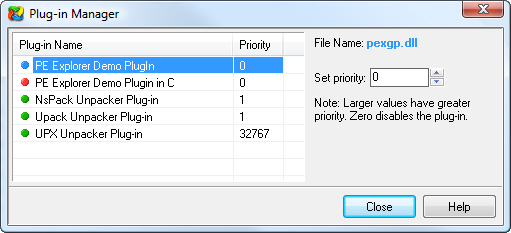
Please note that the Plug-in Manager currently does not support plug-in chains (i.e. plug-in processing stops after 1 successfull pass, and other plug-ins are not called). PE Explorer loads the next plug-in only if the previous plug-in returns false after execution.
Develop Your Own Custom Plug-ins
Plug-ins serve as extensions to PE Explorer, enhancing its functionality and allowing users to add new capabilities to PE Explorer. Leverage our extensive plugin system to create your own additional functionality. Consult the PE Explorer help for the plug-in API: you can write your own custom start-up processing plug-in for crypted files handling or unpacking the packed files.
To utilize plug-ins, PE Explorer requires a specific folder named "PLUGINS" within its directory. Users should place all plug-ins (DLLs) in this designated folder. At present, the location of the plug-ins cannot be customized and should reside in the "PLUGINS" subdirectory.
The plug-in API will be extended, therefore when writing custom plug-ins, it is important to pay special attention to the remarks made in the description of Functions and Types (see the PE Explorer Help file), and abide by them. Following these guidelines will keep your coding compatible with future versions of PE Explorer.
The plug-in API can be found in the Help within the PE Explorer package.


Download a 30 day trial version of PE Explorer Buy the Full Version