 English
home  products pe explorer feature tour
Application Manifest Wizard
Resource Editor enables Visual Styles Theme Support via Manifest
Another neat feature of PE Explorer is the unique Application Manifest Wizard. The wizard inserts an application manifest into the resource section of the executable, allowing your legacy application to take advantage of the slick new look for common controls featured in Windows XP and Vista.
The wizard allows you to add the UAC manifest and insert the Require Administrator level into it so that the application would be forced to run elevated as an Administrator on newer Windows, providing the application the same operational behavior as in Windows XP. The modified exe should still work correctly on prior Windows operating systems.
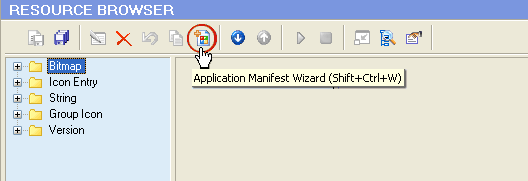
The wizard is very easy to use. There are two fields to fill out, application name and description, from which the wizard generates a visual style manifest for your application.
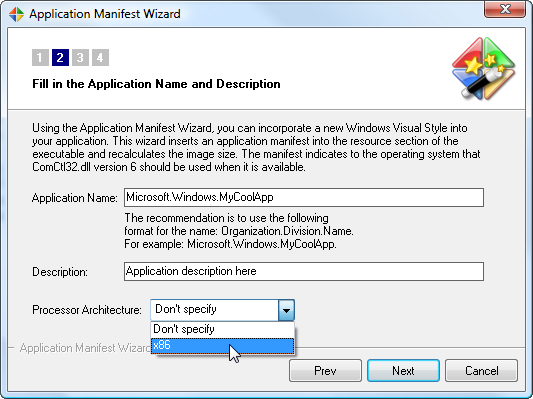
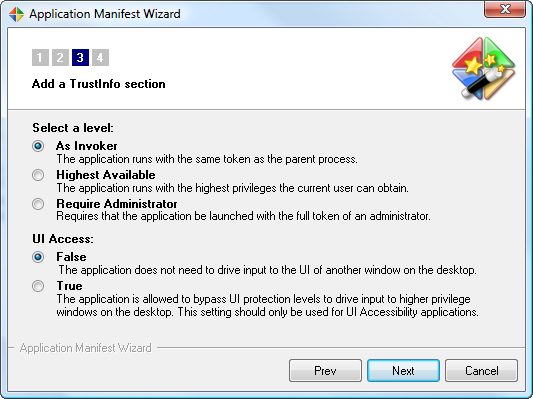
After generating the manifest, the wizard embeds the manifest in the executable as a resource and makes the necessary adjustments to the PE file image.
After the Wizard has finished creating the manifest, you will find the newly generated manifest resource displayed in the Resource TreeView:
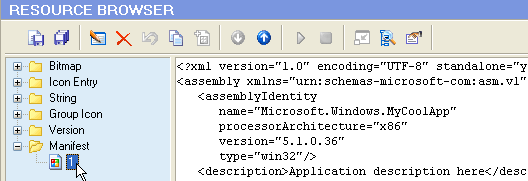
The manifest indicates to the operating system that ComCtl32.dll version 6 and higher should be used when it is available. Version 6.10 includes some new controls and new options for other controls, but the biggest change is support for changing the appearance of controls in a window.
Here is how the common controls for an ordinary application look on Windows XP before and after a manifest has been inserted:
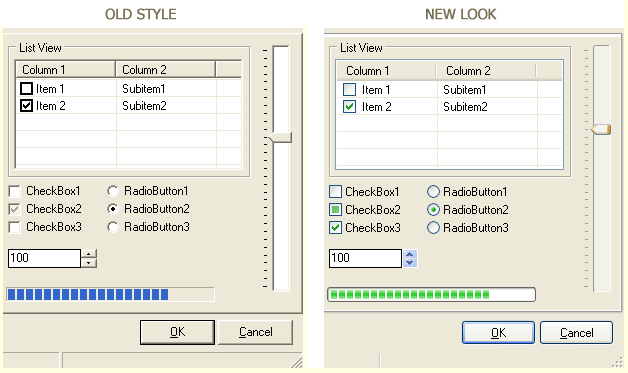
Unlike earlier versions of ComCtl32.dll, version 6 is not redistributable. The only way you can use version 6 is to use an operating system that contains it. Windows XP ships with both version 5 and version 6. By default, applications use the user controls defined in User32.dll and the common controls defined in ComCtl32.dll version 5. If you want your application to use visual styles, you must add an application manifest that indicates that ComCtl32.dll version 6 should be used if it is available.


 Download a 30 day trial version of PE Explorer Buy the Full Version