 English
FlexHex Editor: The Hex Editor For Professional Use
FlexHEX is a high-performance hex editor for professionals who need precision and power. Securely inspect and edit binary files, logical disks, physical drives, and memory areas — even massive files of virtually unlimited size, up to the NTFS limit — with ease. FlexHEX supports 64-bit systems, Unicode and multi-byte encodings, and complex file structures, including OLE compound files, NTFS alternate data streams, and sparse files — all in a clean, intuitive interface built for serious work.
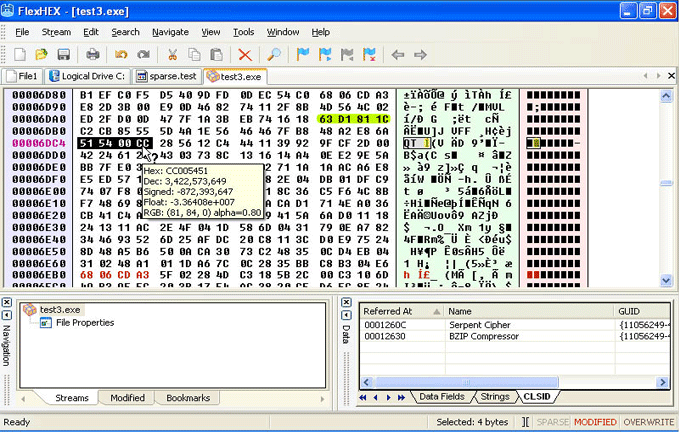
Been searching for a decent hexadecimal editor? Whatever your editing needs are, you will find that the FlexHex Editor continues to meet them. Created by and for software professionals, it combines advanced binary editing capabilities with flexibility and efficiency. This feature-rich hex and disk editor can save hours of manual work each month — and often pays for itself within the first month of use.
 There are several good hex editors out there, but the one I use is FlexHex from Heaventools. While there are many free hex editors I feel that you often get what you pay for, which is why I use a commercial one.
Bridon Security
FlexHex is an essential tool for a wide range of tasks including inspecting binary output, editing raw data content in files or disks, analyzing the structure of proprietary closed-format data files or old data in unknown formats, resolving issues in executable files or flash drives, generating binary files for testing, handling massive data transfers, and much more. With capabilities that extend to low-level disk imaging, cloning, and beyond, FlexHex is a hex editor and viewer that is a must-have tool for anyone requiring these functionalities.
Features
- Supports drives and files of unlimited size (up to the NTFS theoretical limit)
- Edits contents of any file, memory area, logical disks and physical drives
- Support for 64-bit operating systems
- Support for multi-byte and Unicode character sets
- Unlimited multilevel Undo and Redo: you are never at risk of losing your data
- Support for OLE compound files, NTFS alternate streams, sparse files, and more!
- Real-time tracking of the changes made to the file by another application
- Fully customizable layout and colors
- File / Selected area printing
- More details

With FlexHex, You Can
- Manipulate the low-level bytes of any non-ASCII and binary file
- View and edit the hidden data the other hex editors won’t even show you
- Find and fix problems caused by non-printable, control, and formatting characters across text files
- Compare files easily with the Comparison Map tool
- Open, save, paste, or drag-and-drop hundreds gigabytes of data within a second
- Edit files locked by the system or by another application
- Import or export your binary data, or just drag-and-drop data to/from another applications
- Save data in the compressed Zipped Image format
- Validate and analyze data with Search, Replace, and Comparison tools
- Keep track of your position with bookmarks, area lists, jump history, and other handy tools
- Compute checksums (CRC-32, MD5, SHA-1, SHA-256) and browse COM classes
 Check Out The Feature List Have A Look At ScreenShots
Getting Started with FlexHex Frequently Asked Questions
Get Started with a 30-Day Free Trial

This software has no disabled features. Try out the full functionality of this hex editor with many advanced functions.
Why is FlexHex Better Than the Other Hex Editors Out There?
FlexHex stands out among other hex editors thanks to its comprehensive features designed for software developers. FlexHex provides an intuitive framework for editing operations covering all needs you may have. This powerful yet simple to understand program helps you create, modify, inspect, search and replace binary, ASCII, or Unicode data. Advanced users will value its capability to search for strings and GUIDs, calculate checksums, and navigate COM classes.
FlexHex enables you to copy and paste a gigabyte large chunk of data in a split of a second. This is significantly faster than the competing hex editors.
FlexHex does everything you expect from a hex or disk editor — you can explore, create, and edit binary files on local drives, devices, or network shares. But it goes far beyond the basics. Unlike other hex editors, FlexHEX provides full support for NTFS files, which are based on a more complex model than FAT32 files. Specifically, FlexHEX supports sparse files and Alternate Data Streams of files across all NTFS volumes. This means you can now audit your files for the existence of Alternate Data Streams and edit hidden data that other hex editors simply cannot see!
And there’s more: the unique Hot Tracking feature lets you watch in real time as another application makes changes to a file. With FlexHex, there’s no need to keep reloading the same file — any changes are instantly detected and the Edit window refreshes automatically. Hot Tracking is enabled by default for all files opened in read-only mode, giving you a live view of what’s happening behind the scenes.
Start Editing Your Files Now!
FlexHex will run for 30 days but after that time you will need to buy a license. For maximum editing and inspecting power, purchase a FlexHex Business license now for $59.95.