 English
home  products resource tuner tutorials
Resource Tuner: How To Replace Non-Standard Resources
Custom resources are used to store various types of binary data within a resource file. Common data types that may be stored as custom resources include sound (WAV) and video (AVI) files. Other resource types may also be defined by the programmer and are displayed in the Resource Tree in upper case: GIF, JPG, PNG, HTML, XML.
Resource Tuner allows you to extend your editing capabilities by replacing any non-standard resources in a file: TypeLib, CAB, MIDI, EXE, and more.
It is important to note that modifying certain types of binary resources can introduce additional bytes into the resource. Such changes may cause the file to fault during execution. Unfortunately, this is one of the inherent risks associated with modifying executable files.
Replacing Non-Standard Custom Resource
1. Expand the custom folder displayed in uppercase (it can be 'AVI', 'CAB', 'EXE', 'HTML', etc.).
2. Highlight the resource item to be replaced, click on the 'Replace Resource with...' button [Shift+Ctlr+R] from the toolbar as illustrated below and select your
file from disk.
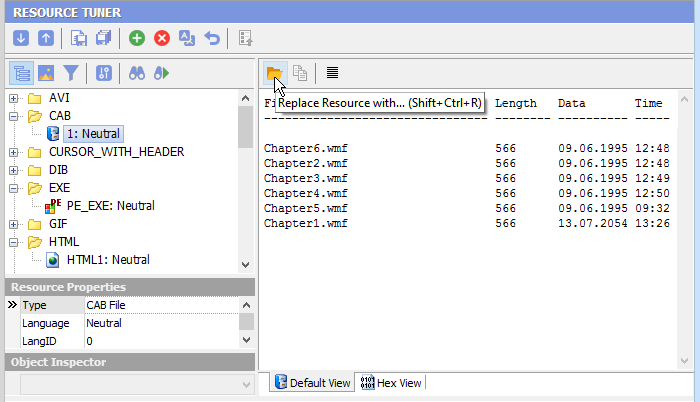
3. Select 'File' → 'Save File' to save the changes made to the target file.
Warning! Resource Tuner cannot validate the content of the data you are loading from disk. Carelessly swapping out this data may render the modified executable inoperable.
See also  Command-line Resource Editor: If you need to to create a repeatable process for updating and customizing resources during the final stage of the build process.
Start Tuning Your Applications Now!
 Give Resource Tuner a trial run for 30 days free! Once you try it, we think you will find it hard to go back to other resource hacking utilities. For maximum editing and inspecting power, purchase a Personal license now for $49.95. The Business license is available for $89.95.