 English
home  products resource tuner tutorials
How to open a DLL, DLL.MUN, or EXE file in Resource Editor
Resource Tuner allows you to open various types of Windows executable files, such as .EXE, .DLL, and .MUN (used in the latest Windows builds for resource storage), along with Screensavers (.SCR), OCX Controls, and more. Once inside, you can change different elements of the user interface, including icons, cursors, dialogs, menus, sounds, animations, and other graphical and text components used in the specific program by editing and replacing resources in the executable file.
It is important to note that while Resource Tuner enables extensive customization of the user interface, it does not grant access to modify the actual program code. The resources are kept separate from the program code, meaning you can make significant changes to the visual aspects of the program while leaving the underlying code unchanged.
For more serious changes (though this may not do you any good unless you have a good understanding of programming functions), check out PE Explorer. For viewing and editing the raw binary data contents of the DLL file, use Flex Hex Editor.
Open an EXE, DLL, or DLL.MUN file in Resource Tuner
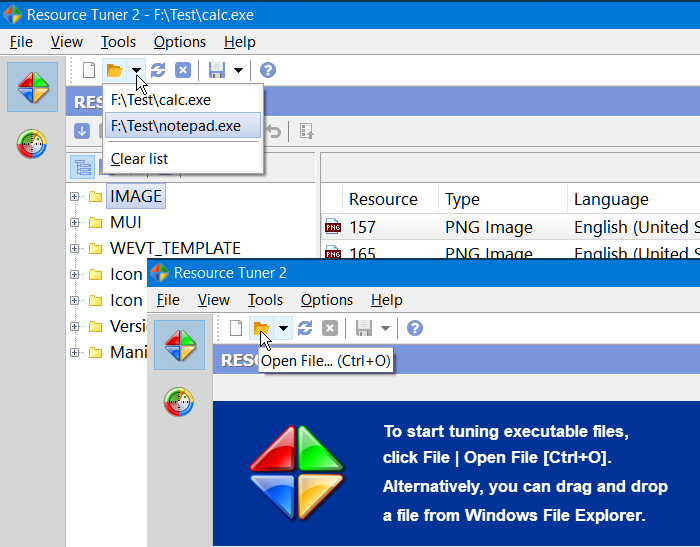
Resource Tuner provides several methods for opening files. To open a file for browsing or editing resources, either click the button on the left side or go to File → Open [CTRL+O]. The dropdown menu next to the Open File button offers quick access to recently opened files, which can also be accessed via the File → Recent Files menu option. The number of files in the list can be managed through the Settings dialog.
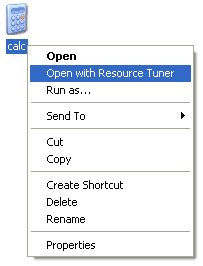
You can initiate opening a file in Resource Tuner by right-clicking it in Windows File Explorer and selecting "Open with Resource Tuner" from the context menu:
 Alternatively, you can drag and drop a file from Windows File Explorer onto the Resource Tuner icon or onto a running instance of Resource Tuner.
Another option is to open a file directly from the command line.
Usage: restuner.exe <filename>
It's recommended to perform all file operations with copies of the original files. Store the copies in a separate directory, not in the parent or home directory of the executable. This practice has clear benefits, including avoiding issues with OLE embedded executables calling DLLs from the parent directory.
Resource Tuner provides three functions that are automatically performed when opening a file: unpacking files compressed with UPX, error checking, and precompiling resources.
If Opening a File Produces an Error
When opening a file in Resource Tuner, you may receive one of the following error messages.
1. Error: This file is likely damaged, packed or compressed.
There's a high probability that the executable has been compressed to appear smaller. Resource Tuner detects and unpacks files compressed with UPX. However, for other compression methods, manual unpacking is necessary before viewing or modifying the file. For such cases, consider using more advanced tools like Heaventools PE Explorer.
This is not viewed as a bug. We respect the security measures implemented by other software authors and cannot support the decompression of every publicly available packer and protector.
2. Error: This is an NE Executable. Not supported!
Resource Tuner exclusively handles 32- and 64-bit PE files. NE (New Executable) files are 16-bit applications designed for the outdated Windows 3.xx platform. Among the recognizable executable types on MS platforms are "MZ" (DOS), "NE," and "LE," but these 16-bit formats are now obsolete.
We do not plan to include support for 16-bit files in Resource Tuner.
3. Error: This is NOT an EXE or DLL File
Resource Tuner does not rely on specific file extensions (e.g., .exe, .dll, .txt) to determine a file's type. You can freely rename your file with any extension or even without one. When you open a file with Resource Tuner, it analyzes the file's header to determine its nature.
If Resource Tuner indicates that a file is not recognized as a DLL, this assessment is accurate. Don't be misled by file extensions; simply renaming a text file with a .dll extension won't magically transform it into an executable DLL.
IF YOU WANT TO VIEW AND EDIT THE RAW DATA CONTENTS OF A FILE:
Then you need a binary hex editor: FlexHex editor. Use it for inspecting binary output, editing the raw data contents of a file, examining the structure of proprietary closed-format data files or old data in unknown formats, quick fixing executable or data files, creating binary files for test runs, and more.
Start Tuning Your Applications Now!
 Give Resource Tuner a trial run for 30 days free! Once you try it, we think you will find it hard to go back to other resource hacking utilities. For maximum editing and inspecting power, purchase a Personal license now for $49.95. The Business license is available for $89.95.