 English
FlexHex Editor Feature List
FlexHEX Editor is a full-featured 32-bit hex and disk editor designed to edit binary files, OLE compound files, logical devices, and physical drives. With FlexHEX you can inspect, modify, insert, search, or replace binary, ASCII, or UNICODE data. In addition to the powerful editing functions, FlexHEX includes an unlimited Undo/Redo feature, so you are never at risk of losing your data because of a typing error.
Viewing and Editing Any Binary Files
- Opens and edits files up to 8 exabytes long (i.e. eight quintillion bytes)
- Any binary formats
- NTFS multi-stream files
- NTFS sparse files
- OLE compound files
- Files locked by the system or by another application
- Logical disks
- Hard disks
- Flash cards and other types of physical drives
- Multiple files can be opened at the same time
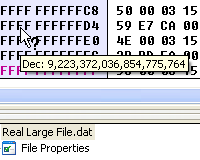 When a competitor claims their product can edit "huge files", in many cases this means 4Gb or sometimes even less. Not so with FlexHEX. By huge file we mean a genuine large file, up to eight exabytes long, a theoretical limit of an NTFS volume using 4K cluster size.
In many current usage scenarios, a 4 GB file-size limitation is unacceptably small. For example, 4 Gb is the file size for approximately 18 minutes of video downloaded from a digital video recorder. With FlexHex, this is no longer a problem. Simply put, no matter how large your file is, FlexHEX handles it.  Read more...
Supported Data Types
- Main edit window: Hex bytes, ANSI/MBCS text, UNICODE text
- Hex bytes, words, doublewords, and quadwords
- Unsigned and signed decimal, bytes, shorts, integers, and 64-bit integers
- ANSI/MBCS and UNICODE strings
- 64-bit FILETIME values
- 64-bit floating point-based DATE type
- 32-bit time_t type
- 32-bit RGB values with alpha component
- GUIDs (Globally Unique Identifiers)
- Support for big-endian byte order
User-Defined Data Types
- Structures, named and anonymous
- Unions, named and anonymous
- Named and anonymous bit structures for accessing bit-based fields
- Fixed- and variable-size arrays
- Fixed-size, variable-size, or zero-terminated ANSI and UNICODE strings
- C-style enumerations
- Special unused, align address, and align offset directives
- User-defined types may be anchored to address (fixed), data (sticky), or to the input caret (floating)
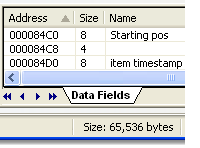 The User-Defined Data Field is a file area to which the user assigned a type and, optionally, a name. If we talk about a program, we would call that object a variable, but for a static file this term does not seem proper.
Although we still can change a data field value by typing new data in the FlexHEX edit window, the Edit Data Field command provides a more convenient way. The Data Field pane lists all defined data fields and lets you navigate them quickly.
Basic Editing
- In-place hex, string, and UNICODE editing
- Editing memory area as typed data
- Data and objects Quick Viewer feature
- Multilevel Undo and Redo, browsable Undo list
- Modified area tracking
- Multi-format data insert, including repetitive patterns
- Sparse data block insert
- Bitwise operations NOT, AND, OR, and XOR on the selected block
- Arithmetic operations: negation, addition, substraction, multiplication, division, and remainder
- Group arithmetic and logical shifts and bit rotates of the selected items
- Data field definition and editing
- Import and export of binary data, or just drag-and-drop them to/from another applications
- Multi-format CSV (comma-separated values) import and export
Clipboard and Drag-and-Drop
- Drag-and-drop files onto FlexHex for quick editing
- Support for binary data and file copy/paste/drag-and-drop
- ASCII, multi-byte (MBCS), and UNICODE data formats
- Automatic binary-ASCII, binary-UNICODE, and ASCII-UNICODE conversion
- Unlimited copy/paste and drag-and-drop size
- Inter-application (including the Windows Explorer) copy/paste/drag-and-drop
Search, Replace, Comparison Tools
- Multi-format Search feature
- Multi-format Find All command
- Multi-format Replace / Replace All commands
- Multi-Search — single-pass search for multiple patterns
- Scan for ANSI/MBCS or UNICODE strings
- Scan for known GUIDs (COM class and interface IDs)
- Pattern coloring option (pattern autoload supported)
- Compare with a file, an alternate stream, a logical or a physical drive
- Partial stream compare
- Comparison maps provide a user-friendly representation of the comparison result
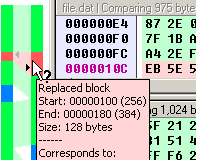 The Comparison Map shows the positions of the blocks in the files being compared, and how they correspond. Left-click a file in the map to jump to the corresponding position. Right-clicking displays the comparision map menu.
You can compare files in whole or partially. If you wish to compare only parts of the files, check the Block Comparison box and enter the starting offsets and sizes of the blocks to be compared. Leave the offset field empty to compare starting from the lowest address; leave the size field empty to specify the rest of the file.
Navigation
- Bookmarks in the Visual Studio style
- Direct browsing using Navigation Panes: Streams, Area, Bookmarks, Found Data, and Compare
- Direct browsing using Data Panes: Data Fields, ANSI/MBCS/UNICODE Strings, CLSIDs, and IIDs
- Address/offset jumps
- Unlimited jump history
Other Neat Things
- File / Selected area printing
- CRC-32, MD5, SHA-1, SHA-256 checksums
- Cryptographically strong AES-based random number generator
- Browsing of registered COM classes
- Advanced calculator supporting binary and text drag-and drop
- Customizable user tools menu
- Fully customizable layout and colors
- Byte order autoselection
- Visual Studio-like customizable user interface including toolbars, menus, and keyboard shortcuts
- Windows Explorer integration
- Command-line interface
- Want more? Tell us!
Get Started with a 30-Day Free Trial

This software has no disabled features. Try out the full functionality of this hex editor with many advanced functions.