 English
Resource Tuner: Frequently Asked Questions
 For your convenience, a list of frequently asked questions is provided below. Please be sure to review this list, as your question may have already been addressed here. If the solution you seek is not here, please feel free to contact our Technical Support.
Also note that another important source of information is the extensive Help system that has been provided with Resource Tuner. The Help system is well-organized and very easy to use. Moreover, by taking a few moments to review the help, you will better familiarize yourself with the program and learn more about all the features available. See also our Tutorials and How-to articles.
Questions
Common Questions
- What is the difference between the trial version and the full version?
- Is Resource Tuner a developer tool, or is this something a general computer user would use?
- I downloaded Resource Tuner for getting some music and pictures from an EXE file (a game). But it only shows application icons, few dialogs, and other data (strings) files. Why?
File Open
- Why can't I find anything but version and icon resources in the EXE I'm looking at?
- I got an immediate error of something like "This file is likely damaged, packed or compressed". What can I do?
- What are packers?
- I got an immediate error of something like "Incompatible" and "of type NE". What is a "NE" type file?
- What is a PE file? I heard of them but thought my OS couldn't run them?
- Will the Resource Tuner work with NE and other 16-bit files?
- If Resource Tuner doesn't work on NE type files, do you have a product that does?
- Does Resource Tuner handle .NET resources in managed assemblies?
File Save
- Why the original file size is increased after a simple "Save as..." operation?
- When I try to save my DLL file in the Program Files folder, Resource Tuner reports a save file error. What may be the problem? How can I solve this issue?
- When I try to save my DLL, I get the following error: Can't create a new file, the original file has been probably packed. Any hints?
Resource Editor
- How do I change the Icon in an EXE file? How do I get started with editing PE file resources?
- How do I export all resources, edit them and import them back?
- It seems to only handle regular Win32 resources. Do you have a version that handles .NET resources in managed assemblies?
- Why does Resource Tuner tell me that the icons I have selected to replace do not have the same size and the same bits and color depth? Can you fix it?
- I can't copy and paste icons from any file, including .exe and .dll files. Any ideas?
- Resource Tuner displays all the text as "??????" Am I overlooking something?
- Is there a possibility to change the Windows Start Up Video?
- How can I edit resources from the command line?
- I need a command-line tool to change the Icon in an exe file. Do you have that?
Plug-ins
Common Questions
What is the difference between the trial version and the full version?
Your evaluation copy of Resource Tuner is a fully-featured release, providing the same capabilities as the registered software. This allows you to explore all the features in Resource Tuner to ensure they meet your needs.
However, when in trial mode, Resource Tuner doesn't allow for saving all resources to disk at once. Additionally, the resulting executables modified with the trial version will contain watermarks in the Version Info resource, displaying a custom string, such as "Made with an unregistered copy. Register to remove this message". Please buy a license and get the full program, no limits.
Is this a developer tool, or is this something a general computer user would use?
Both ways. Whether you're a developer looking to modify resources or a general user curious about exploring files, Resource Tuner can be a valuable tool. Anyone can play with the file's resources and learn a lot from it. Training for the initial use is almost not required at all. See also: Resource Tuner Tutorials
I downloaded Resource Tuner for getting some music and pictures from an EXE file (a game). But it only shows application icons, few dialogs, and other data (strings) files. Why?
The reason you're not finding music and pictures within the exe file using Resource Tuner is that the game's executable file likely doesn't store these assets as resources within the file itself.
Resource Tuner can only display and manipulate resources that are embedded within the exe file's resource section. If the music and pictures are stored externally or in a format that isn't recognized as a standard resource, Resource Tuner won't be able to access them directly. You may need to look for additional tools or methods to extract the music and pictures from the game.
File Open
Why can't I find anything but version and icon resources in the EXE I'm looking at?
If you open an EXE file and only see version information and a few icons — but no dialogs, menus, or other resources — there are a couple of common reasons:
1. The Program Was Built with Visual Basic or .NET
Programs created with Visual Basic (especially older versions) or .NET don’t use standard Windows resource formats for things like dialogs, menus, or strings. Instead, they store that information inside the program code in a custom, closed format.
Because of this, Resource Tuner can’t display or edit those elements — they simply aren’t stored in the usual way. The only resources typically visible in a Visual Basic or .NET executable are basic ones like the application icon and version info.
2. You're Looking at an Installer or Setup Package
If the EXE is an installer (like a setup program), most of the content is compressed and stored after the end of the main executable structure. These files often appear very similar when opened — with just an icon and version info showing in the Resource Editor.
This is normal and expected: the actual installation data is packed in a custom format that can’t be read like a standard Windows application.
In short: If you’re not seeing menus, dialogs, or other expected elements, it’s likely because the EXE was built in a way that doesn’t store those parts as standard resources — so there’s nothing for the editor to show.
I got an immediate error of something like "This file is likely damaged, packed or compressed". What can I do?
Nothing. This is not viewed as a bug. We are not going to defeat the security attempts of other software authors. Resource Tuner unpacks only files compressed with UPX using the Plug-In subsystem.
Packers are utilities that compress Windows portable executables (EXE, DLL, etc) significantly while leaving them 100% functional. Many packers also include encryption for data and resources within the executable, aiming to protect the files from reverse engineering or tampering.
The use of packers can make executable files more compact and harder to analyze, making them a common choice for software protection and distribution.
I got an immediate error of something like "Incompatible" and "of type NE". What is a "NE" type file?
Resource Tuner works exclusively with PE (Portable Executable) files. An NE (New Executable) file is a 16-bit application designed to run on Windows® 3.xx. Since Resource Tuner is focused on working with PE files, it is incompatible with NE files.
What is a PE file? I heard of them but thought my OS couldn't run them?
"PE" stands for "Portable Executable". The term "Portable Executable" was chosen because the intent was to have a common file format for all flavors of Windows, on all supported CPUs. A PE file is a 32-bit executable developed by Microsoft for NT (and Win95). The other notable executable types that run on MS platforms are "MZ" (DOS), "NE" and "LE" — but those formats are obsolete (but they will still run). Open an exe file in a hex editor or binary viewer and the first two values in the file will be 'MZ' — yes the DOS header is still there. Scan down 128 bytes and in most cases you should find the values 'PE' — this is where the PE format takes over. For greater detail, download PE Explorer, our flagship product, and consult the help file.
Not all PE files have the "exe" extension. There are various types of PE files with different extensions, such as "dll", "mun", "scr", "sys", "cpl", "ocx", and "msstyles". Among these, PE files like exe, scr, and cpl can run independently, while dll files, for instance, typically serve as dynamic link libraries and require another executable, like an exe file, to run. Each type of PE file serves a specific purpose within the Windows operating system.
Will the Resource Tuner work with NE and other 16-bit files?
No. The NE format is obsolete.
If Resource Tuner doesn't work on NE type files, do you have a product that does?
No. At any rate, knowledge of 16-bit format makes less sense especially since the 64-bit processors have hit the market.
Does Resource Tuner handle .NET resources in managed assemblies?
No, Resource Tuner does not handle .NET resources in managed assemblies. It is designed to work with unmanaged 32-bit and 64-bit PE files. While some .NET files may share the PE format, Resource Tuner does not fully support .NET assemblies.
File Save
If I open an executable with Resource Tuner, save it under a different name without making any changes, and compare the two files with a hex editor, there are many changes. Why is this happening?
Resource Tuner automatically performs two functions when opening files: unpacking files compressed with UPX using the Plug-in subsystem and error checking.
If your target file was packed with UPX, it was automatically unpacked and saved unpacked. Resource Tuner does not re-pack previously packed files, which is why the original file size increases. Check the logfile for details.
Additionally, Resource Tuner recompiles the file resources according to the Microsoft PE File Specification, which may also alter the original file size after a simple "Save As..." operation.
If you don't want any changes to be made, simply do not save.
When I try to save my DLL file in the Program Files folder, Resource Tuner reports a save file error. What may be the problem? How can I solve this issue?
The issue you're encountering is due to permission restrictions in the Program Files folder. Windows prevents modifications in this folder to protect system files. To resolve this issue, follow these steps:
1. Copy your DLL file to another location on your computer, such as your Desktop or Documents folder.
2. Make the necessary changes to the file and save them.
3. Copy the modified DLL file back to the Program Files folder.
You'll likely need administrative permissions to paste the file back into the Program Files folder.
When I try to save my DLL, I get the following error: "Can't create a new file, the original file has been probably packed". Any hints?
When encountering the error message "Can't create a new file, the original file has been probably packed" while trying to save your DLL, consider the following:
- The error might be due to attempting to save the file within the Program Files directory. Modern Windows versions restrict users from saving files in this location for security reasons.
- It's important to remember that your DLL might indeed be packed. Resource Tuner specifically unpacks files compressed with UPX. If your DLL was packed using a different third-party packer, you'll need to manually unpack it before making modifications. Otherwise, the tool might not be able to create a new image file and save your changes.
To address this issue, try saving the modified DLL in a different directory outside of the Program Files folder. If your DLL is packed using a different packer, look for instructions or tools to manually unpack it before proceeding with modifications.
Resource Editor
How do I change the Icon in an EXE file? How do I get started with editing the PE file resources?
To learn more about using Resource Tuner for these tasks and others, you can refer to the Resource Tuner Tutorials. These tutorials offer step-by-step guides on performing various tasks with the Resource Editor, helping you gain confidence in editing PE file resources effectively.
How do I export all resources, edit them and import them back?
The current version of the Resource Editor has no import feature. We recognize the potential value of this feature, but this will be available only in future versions.
It seems to only handle regular Win32 resources. Do you have a version that handles .NET resources in managed assemblies?
No. Or not yet.
Why does Resource Tuner tell me that the icons I have selected to replace do not have the same size and the same bits and color depth? I keep getting a mismatch error. Can you fix it?
The mismatch error you're encountering in Resource Tuner is not a program error, but rather a requirement based on the specifications of icons within an executable (EXE) file.
Icons are not just single images. Icons in an EXE file can come in various sizes and color depths, and they are organized in groups called "Icon Groups".
Here's an example of an Icon Group found in the Notepad application:
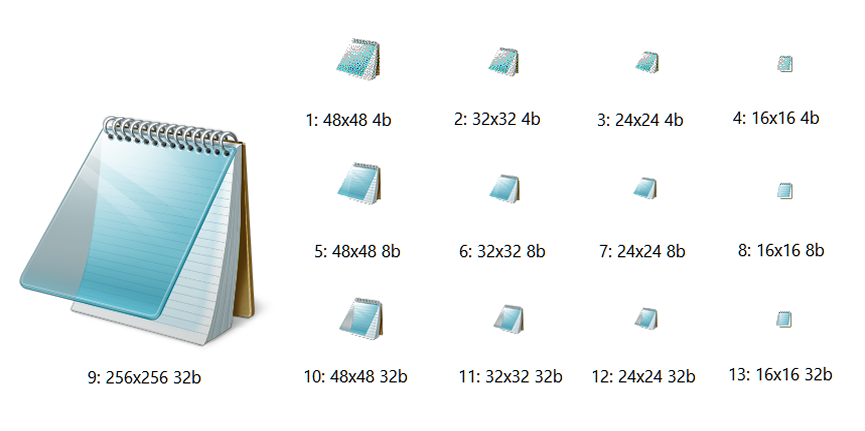
Each Icon Group can contain multiple icon images, each with a different size and/or color depth. Common sizes include 16, 32, 48, and 256 pixels square, color depths include 32-bit (24-bit with 8-bit alpha channel), 8-bit (256 colors) and 4-bit (16 colors).
When Windows displays an icon, a desktop shortcut for example, it selects the appropriate image from the Icon Group based on specific criteria. If the replacement icon doesn't match the original icon's size and color depth, it could lead to inconsistencies in how the icon is displayed in different contexts.
If you encounter a mismatch error while attempting to change an icon that appears to have the same size and bits, it indicates that the source icon's color depth is not the same (24-bit and 32-bit icons may look similar but have different color depths).
I can't copy and paste icons from any file, including .exe and .dll files. Any ideas?
The reason you're unable to copy and paste icons from files like .exe and .dll is due to the unique format of .ico (icon) files. Although icons may appear similar to regular graphic images, they have a distinct structure specific to their purpose.
The clipboard does not support the .ico format and copying/pasting .ico files. To extract icons, use Save to disk. To replace icons, use Open the source file from disk instead Paste from the clipboard.
Resource Tuner displays all the text as "??????" Am I overlooking something?
The issue you're experiencing with Resource Tuner displaying all text as "??????" is likely related to the Windows locale settings. To resolve this, you need to ensure that your global Windows locale is set to a locale that supports the language or characters you need.
Is there a possibility to change the Windows Start Up Video?
The start-up video in Windows is composed of a series of PNG images that are embedded in \System32\authui.dll file or \SystemResources\authui.dll.mun file (latest Windows 10 builds are using *.MUN files for storing resources). Just open this file in Resource Tuner, extract the images, edit them, or replace the PNG images with your own PNGs, and you are done.
Keep in mind that modifying system files like authui.dll.mun can potentially lead to system instability if not done correctly.
How can I edit resources from the command line?
We offer Resource Tuner Console, a script driven command-line version of the resource editor. This command-line tool for editing resources in Windows 32- and 64-bit EXE and DLL files combines a robust resource editor with intelligent script capabilities and full Unicode support.
I need a command-line tool to change the Icon in an exe file. Do you have that?
Yes, we have a solution: Resource Tuner Console. It's a command-line tool designed for resource editing, including changing icons in executable files. Resource Tuner Console allows you to perform various resource-related operations using scripts, making it suitable for automating tasks.
With Resource Tuner Console, you can create a script that specifies the icon replacement process, including the icon file to be inserted, the target executable, and other relevant parameters. This tool supports various commands and options to manipulate resources within executable files.
Don’t like writing scripts? We have that covered. After installing Resource Tuner Console, you can access a diverse set of sample scripts that showcase its basic functionality. All sample scripts are pre-configured, and you can run them without any additional setup.
Sample scripts can be found within the Resource Tuner Console package.
Plug-ins
How can I write my own custom plug-in for Resource Tuner?
Download Resource Tuner and consult the help for the plug-in API: you can write your own custom start-up processing plug-ins for crypted files handling and unpacking the packed files.
Start Tuning Your Applications Now!
 Give Resource Tuner a trial run for 30 days free! Once you try it, we think you will find it hard to go back to other resource hacking utilities. For maximum editing and inspecting power, purchase a Personal license now for $49.95. The Business license is available for $89.95.