 English
home  products resource tuner console feature tour
Batch Changing Icons in Executable Files
If your build process involves replacing icons in the release EXE files, Resource Tuner Console is the solution! From now on, you no longer have to worry about how your applications look on modern versions of Windows.
 No matter how slick the behind-the-scenes source code is, most users form their first impressions based on what they see — the icons. The large 256px icons contribute towards the elegant interface appearance. And this is probably the biggest pain point as not every IDE allows for embedding this resource type, and not every installation software creates installer EXE's with the right icons embedded.
This problem affects developers of all experience levels, particularly those using older IDEs that lack modern capabilities for adding large icons to applications. Many developers face difficulties in ensuring their applications have visually appealing icons that make a lasting impression on users.
Resource Tuner Console comes to the rescue by offering a powerful solution to this issue. It allows developers to embed large icons into compiled EXE or DLL files directly from the command line, eliminating the need for IDE-specific support. Additionally, Resource Tuner Console handles both the traditional 256px Vista icons in .ico format and the newer icons in .png compressed format. This versatility ensures that developers can seamlessly integrate visually stunning icons into their applications, regardless of the IDE or installer maker used to create the executable file.
Moreover, Resource Tuner Console's support for any 32-bit and 64-bit unmanaged PE files makes it an invaluable tool for developers working on various projects with different file formats.
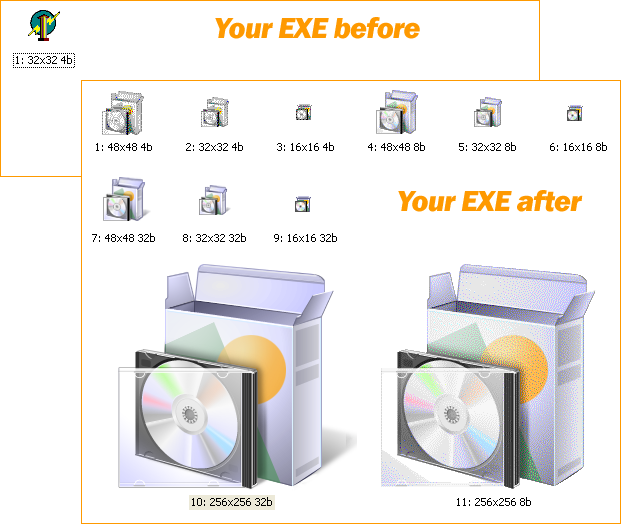
From now on, you don't have to change icons manually. Resource Tuner Console provides many ways of batch replacing Icon entries in the IconGroups. Choose from several options, including adding new icons, replacing existing icons, smart icon replacement based on matching dimensions and color depth, or language-specific icon replacement.
For a deeper understanding, refer to the Edit Icons sample script. This example serves as a helpful template for creating custom scripts tailored to your specific icon replacement needs. Resource Tuner Console empowers you to enhance your application's visual appeal without the manual burden of icon changes.
See also: RTC Usage and Guide To Using Scripts
SAMPLE SCRIPTS LIBRARY
Resource Tuner Console includes various examples that showcase its basic functionality and highlight the numerous features available. After installing Resource Tuner Console, you can access these examples in the Demo Scripts folder, located within the installation directory. The Demo folder contains 12 subdirectories, each containing sample scripts and executable files.
All sample scripts are pre-configured and ready to run. To execute a sample script, simply select one of the .BAT files within the Demo folders. The script will apply changes to a test EXE file. The modified file will be generated in a directory named "Release", which will be located within the same directory containing the script.
These examples provide hands-on experience and demonstrate the capabilities of Resource Tuner Console effectively. Happy experimenting with Resource Tuner Console's powerful features!
Check out the samples to get an idea of what Resource Tuner Console can do for you.
 The Complete Illustrated Step-by-Step Guide To Using Scripts
Have A Question?
Please check our FAQ section for answers to the most commonly asked questions.
If you have any questions about Resource Tuner Console, please contact us. We would love to get your feedback! Your opinion is of great use to us. This helps us focus our time on features people are really interested in.
Get Started with a 60-Day Free Trial
Download ResTuner Console and learn how it can make you more productive.
 Resource Tuner Console runs on all versions of Windows in use today: from 11 to XP, both 32-bit and 64-bit.